

FAQs
I already have an EU Login account, but I am not able to apply for a competition. What can I do?
If you are experiencing issues accessing the Single Candidate Portal or applying for a competition, please check the situations below.
1. If you receive the message: “No Trusted Platform or Security Key found”
This means that you have not yet configured a second-factor authentication method (trusted platform) for your EU Login account.
What to do:
- Log in to your EU Login account and go to your account settings (gear icon in the top-right corner next to your name).
- Add a trusted platform by following the instructions on “How to add a trusted platform”.
- If the issue persists, please contact the EU Login Helpdesk.
2. If you experience issues with the EU Login Mobile App or QR code
What to do:
- Follow the instructions on “How to add a mobile device and EU Login App”.
- If the issue persists, please contact the EU Login Helpdesk.
- To avoid such issues, you may use a trusted platform as your second-factor authentication method instead.
3. If you receive one of the following error messages:
- “Security constraints prevent access to the requested page - Single Candidate Portal”
- “Logout successful. User not found.”
- “OIDC auth code validation failed”
This usually means that you need to create a new EU Login account.
What to do:
Create a new EU Login account using a different email address that has never been used for an EU Login account before. Please follow the instructions on “How to create a Single Candidate Portal account”.
4. If you receive a “Profile requirement notice” pop-up message as seen in the picture below
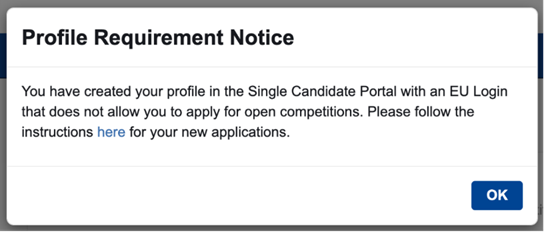
This means that your account was created using a third-party sign-in option such as eID (e.g. itsme, SPID, ROeID, DigiD), Facebook, or Google. Accounts created using third-party sign-in methods cannot be used to apply for EPSO competitions.
What to do:
- Create a new account following the instructions on “How to create a Single Candidate Portal account”. It is recommended to use a different web browser.
- To request deletion of the account created using a third-party sign-in method (user IDs starting with “v00”), please contact the EU Login Helpdesk.