

Consult the contract staff section and select the profile that best matches your academic and professional background.
Please read all important documents, especially the Call for Expressions of Interest.
Clicking “Apply” will prompt you to log into your unique EPSO Account. If you don’t have one, you can create it at that time.
You can then register in the contract staff database by completing an application form.
When recruitment needs arise, EPSO searches the database and creates a shortlist of candidates matching the job requirements.
Shortlisted candidates take reasoning skills tests (verbal, numerical, and abstract). Successful candidates may be invited for an interview with the recruiting institution and potentially hired.
Test invitations and other updates are posted in your EPSO Account. You can also subscribe on the profile page to receive notifications.
You may also apply directly for contract staff job vacancies and be invited to sit the tests. However, passing the tests is required to be hired.
How to apply for a contract staff selection procedure?
Auf meinem Ausweisdokument befinden sich Namen und Foto nicht auf derselben Seite, und ich werde in Kürze einen Online-Test für ein Auswahlverfahren für Vertragsbedienstete (CAST) ablegen. Was soll ich tun?
Wenn sich auf Ihrem Ausweisdokument Name und Foto nicht auf derselben Seite befinden, erstellen Sie bitte eine PDF-Datei mit beiden Seiten des Ausweisdokuments. Laden Sie diese in Ihr Bewerberkonto hoch UND teilen Sie dies EPSO über das Kontaktformular mit.
Im Zuge der Identitätsüberprüfung am Testtag müssen Sie ein Foto von der Seite Ihres Ausweisdokuments machen, auf der sich Ihr Foto befindet.
How do I choose the languages of the tests for a contract staff selection procedure?
When filling in the application form, you must select the languages in which you want to sit the tests.
For most profiles, you will need to choose two different languages (Language 1 and Language 2), in line with the Call for expression of interest:
- Language 1: any of the 24 official EU languages, used for the reasoning tests (verbal, numerical and abstract)
- Language 2: English, French or German, assessed by the recruiting service during interviews and/or further tests organised by these services
Choose the languages carefully, as they should be the ones in which you will perform best.
How do I choose the languages of the tests for a competition?
When filling in the application form, you must select the languages in which you want to sit the tests. For most competitions, you will need to choose two different languages (Language 1 and Language 2), in line with the “Languages used in this competition” section of the Notice of Competition (NoC).
You can usually select any two of the 24 official EU languages, so choose the ones in which you will perform best. For linguists’ competitions, specific language requirements may apply. Always check the NoC for the rules applicable to your competition.
Please note that your language choices cannot be changed after the application deadline.
Do I need to complete my profile and my CV before I start the application?
As explained in the message displayed in the pop-up, some mandatory information in your account must be filled before you can start the application:
- For all candidates: in “My CV”: at least 2 official EU languages in the “Language Skills” AND at least 1 “Education and Training” AND a copy of your ID document.
- For external candidates only: in “My profile”, you must provide your nationality.
- For internal candidates only: in “My Profile”, you must insert your personal email address.
Once this information is completed, you will be able to start the application normally.
We recommend watching our step-by-step video tutorial on how to apply, which guides you through the entire process, and helps avoid common issues.
I already have an EU LOGIN, however I am not able to apply for a competition. What can I do?
If you are encountering issues with applying or accessing the Single Candidate Portal, you can find below some possible solutions to your problem.
If you receive the following message: "No Trusted Platform or Security Key found."
This means you have not yet configured your EU login with the second-factor authentication method (trusted platform).
What to do:
If you are unable to access the "My Account" section, you can manage your account settings by logging in with your password and clicking on the settings (gear icon) in the upper right corner next to your name.
To add a trusted platform, see the instructions on how to add a trusted platform
If you continue to experience issues, please contact EU Login helpdesk.
If you have errors or issues with your EU Login Mobile App – QR Code:
What to do:
Read the instruction on How to add a mobile device and EU login App.
If the problem persists contact EU Login helpdesk.
To avoid this issue add the trusted platform as second-factor authentication method instead.
If you are receiving one of the following error messages:
- Security constraints prevent access to the requested page - Single Candidate Portal.
- Logout successful. User not found.
- OIDC auth code validation failed
This means you need to create a new EU Login account.
What to do:
Please use a different email (never used for any EU Login account before) to create a new EU login, following the instructions on How to create a Single candidate portal account.
If you get the following popup message with a “Profile requirement notice” (see the picture below) :
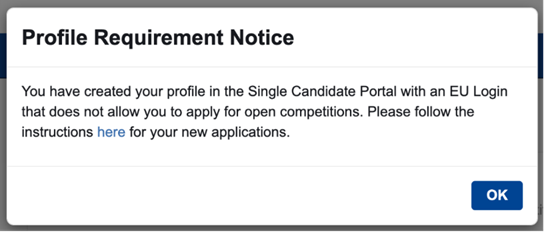
This means you have created your account using a third-party sign-in option such as: eID (such as itsme, SPID, ROeID, DigiD, etc.), Facebook or Google. Accounts using third-party sign-in methods are blocked from applying to EPSO competitions.
What to do:
You must create a new account (please use a different web browser) following the instructions on How to create a Single candidate portal account.
For the deletion of the account created using third-party sign-in option (user ID that start with “v00”) please contact EU Login helpdesk.
By when must I upload my diploma for the Graduate administrator (AD5) competition?
You must upload the copy of your diploma by 07/10/2026 at the latest. Please read the instructions on How to fill in the application form.
Do I need a proof (certificate, diploma etc) for my language knowledge?
No, you don’t need a certificate or a diploma to prove the knowledge of your languages. You will sit the tests in the 2 languages chosen by you in the application form.
What happens if I pass the tests in a competition?
Candidates who are successful in the competition, will be placed on the reserve list, from which any of the European Union institutions, bodies or agencies may recruit.
Most EU officials begin their careers in Brussels or Luxembourg, where most EU institutions are based and where much of the EU’s policy-making takes place.
Erhalte ich nach Einreichung meiner Bewerbung für ein Auswahlverfahren eine Bestätigungs-E-Mail?
Nein. Die Einreichung Ihrer Bewerbung wird nicht per E-Mail bestätigt.
Um zu sehen, ob Sie Ihre Bewerbung eingereicht haben, klicken Sie in Ihrem Konto im Single Candidate Portal auf „Meine Bewerbungen“. Wenn Ihr Bewerbungsstatus „Eingereicht“ ist, haben Sie Ihre Bewerbung erfolgreich eingereicht.